
Rewarding residents for taking part

Consultation asks a lot of local people. We ask them to read about a scheme, answer questions and come back when the proposals change. Most do so with little sign that their time has been noticed. Many take part once and are not heard from again.
Contribution awards are a light way to recognise that effort. Residents with an account on a project website earn points and badges as they take part. They can also see a simple record of what they have contributed. The examples here are from Boyd Park, our demo project: a fictional garden village scheme by Dalton Developments.
What residents see
When residents sign in, their account page has two parts. Your details holds their name, address and other profile information. Your contributions shows the points they have earned and the badges they have collected. It also shows the next badge within reach, their recent activity and the ways they can earn more points.
Each person sees only their own activity. The aim is not competition but acknowledgement: a clear sign that each response, idea or comment has been received.
Activities that earn points
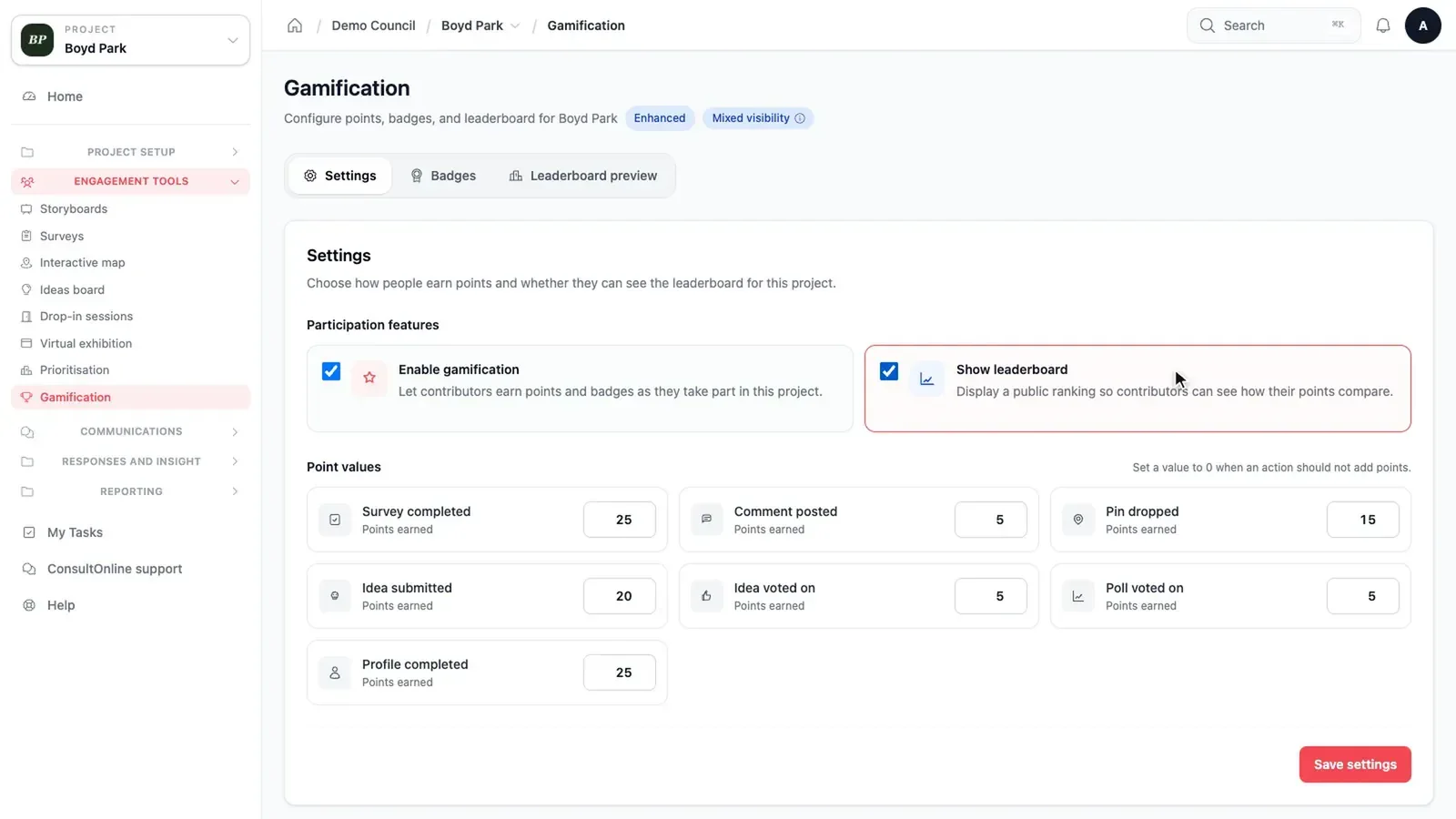
Points are awarded for the activities that help a consultation most. These include completing a survey, dropping a pin on the interactive map, sharing an idea, voting on ideas, commenting on ideas and completing a profile. Completing a profile is particularly useful because it gives the project team a clearer picture of who has taken part.
You decide how many points each activity is worth. Set an activity to zero and it simply stops earning points.
Settings
Badges for milestones
Badges mark milestones. Each has a name, a short description and an icon. A badge is awarded either when someone completes an activity a set number of times or when they reach a points total. Dropping two pins on the map might earn one badge, for example. The Boyd Park demo includes badges such as First response, Map contributor and Ideas champion. You can create your own to suit the project.
Awards sit alongside the rest of the website rather than changing it. Residents earn points by using the survey, map and ideas wall as normal. Nothing extra is asked of them. The project team sees the same responses in the dashboard as it always has.
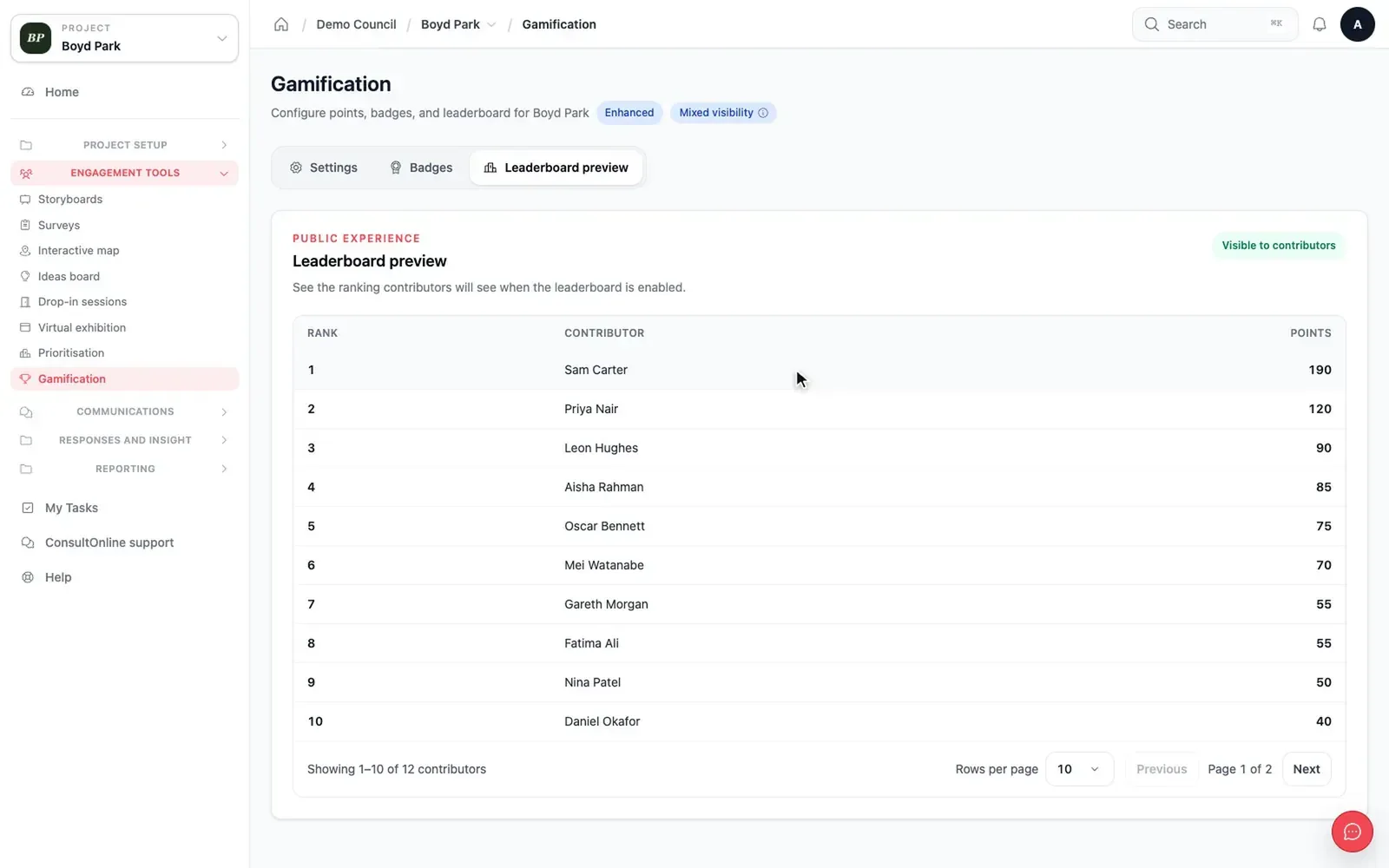
There is also an optional leaderboard. You can preview it in the dashboard exactly as contributors would see it before deciding whether it suits your consultation.
Leaderboard preview
Used with care
A planning consultation is not a game, and contribution awards are designed to stay in the background. There are no prizes. Points have no bearing on how responses are counted or reported. A resident who answers one survey is heard in exactly the same way as one who takes part in everything. If awards do not suit a particular scheme, they can be switched off.
Used well, awards help with the quieter parts of a consultation. They encourage people to complete their profile and return to the map when new plans are published. They also give residents a reason to look at activities they may have missed, such as an ideas wall or a priorities exercise.
How it works
- Open Gamification in your project dashboard and tick Enable gamification.
- Set the points for each activity or leave the defaults in place.
- Create or edit badges, choosing whether each is earned by repeating an activity or by reaching a points total.
- Residents see their points and badges on their account page on your project website.
A reason to come back
Long consultations depend on people returning as the proposals evolve. Contribution awards are included in our Enhanced and Bespoke packages. To see them on Boyd Park, book a demo.