
Stakeholder CRM
Manage stakeholder records, track activity recorded in ConsultOnline and run targeted email campaigns in the same platform as the consultation. Coverage depends on configured channels, integrations and imported data, so reconcile external activity before reporting.
Complete Stakeholder Profiles
Stakeholder profiles can hold available contact, organisation, role, interest and activity data. The timeline covers activity recorded or linked in ConsultOnline; it may omit email, event, response or external-channel activity and should not be treated as a complete history.
Email Campaign Management
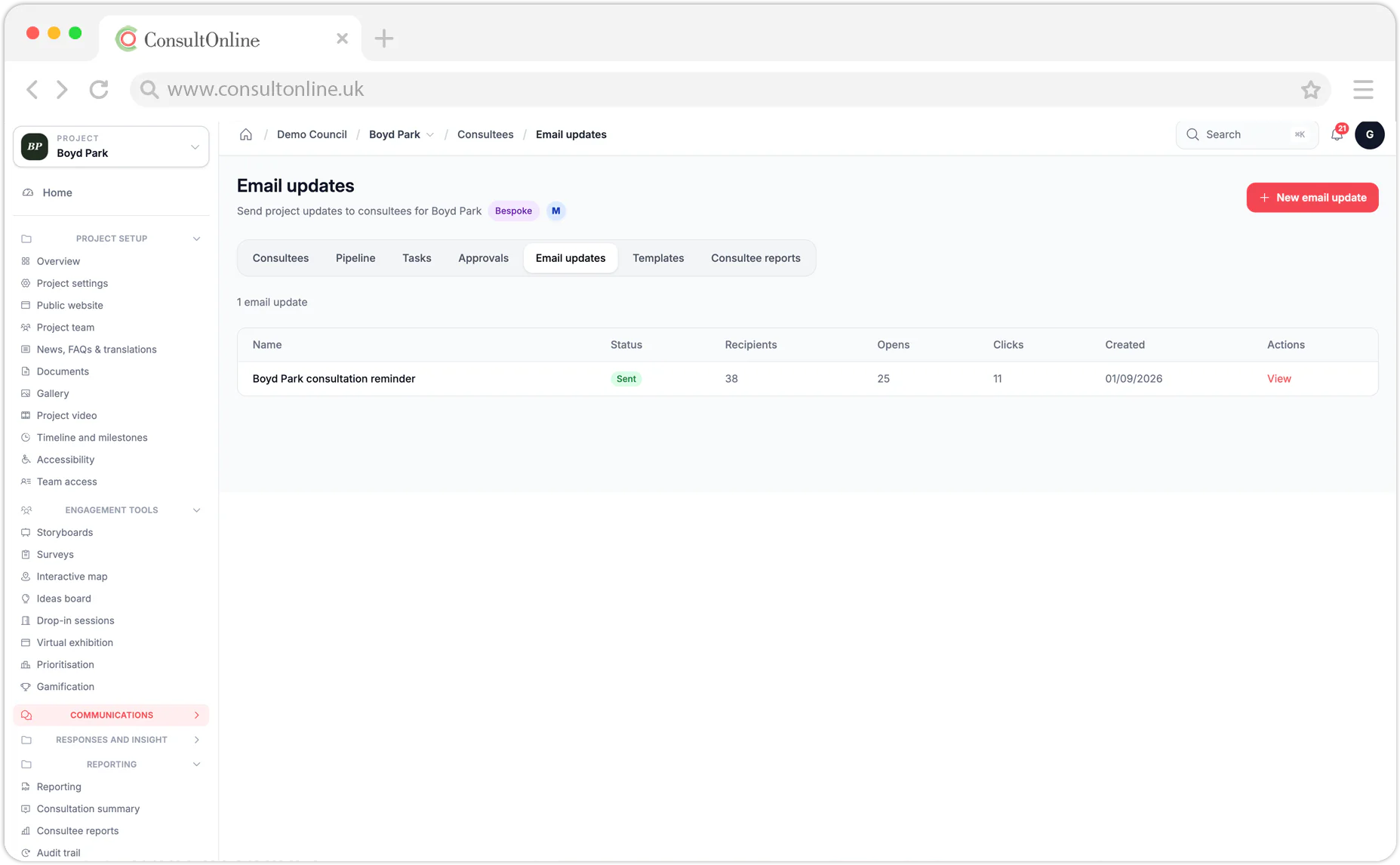
Send email campaigns to selected stakeholder lists and review provider-reported delivery, open, click and bounce events. Templates can support consistent wording, but metrics are limited by mail-client privacy settings and do not prove that a message was read or acted on.
Smart Segmentation
Segment recorded stakeholders by available interest, location, engagement, organisation or custom tags. Build lists and filter by linked response status to support targeted communication. Data quality, consent, contact details and delivery settings still require review.
The Engagement Advantage
Why stakeholder management matters for consultations
Planning consultations involve ongoing relationships with resident groups, local businesses, consultees, elected members and individual community members. A stakeholder CRM gives teams a shared place to record contacts, activity and relevant notes instead of relying only on separate spreadsheets and inboxes.
Consultation teams may need to evidence who was contacted, when and through which channel. Records held in the CRM can support Statements of Community Involvement and other reporting, subject to the completeness of the data entered and the requirements that apply to the project.
Stakeholder records and segments can help teams identify follow-up activity and tailor communications. Participation outcomes still depend on the audience, contact data, message and wider engagement approach.
How It Works
From contacts to campaigns in three steps
Build Your Contact Database
Import existing stakeholder lists from CSV files or add contacts individually. ConsultOnline automatically creates stakeholder profiles for anyone who responds to your consultations, so your database grows organically as you engage. Tag contacts with interests, locations, organisation types and custom fields to build a rich, searchable directory.
Segment & Target
Create stakeholder segments based on any combination of criteria — location, interest area, engagement history, organisation type or response status. Save segments as reusable lists for future consultations. When you launch a new project, your relevant stakeholders are already identified and ready to contact.
Engage & Track
Send email campaigns using built-in templates, track available delivery and engagement events and monitor recorded responses. Supported interactions are added to the stakeholder profile, creating a shared timeline for your team.
Use Cases
CRM tools for every stage of consultation
From early stakeholder identification through to post-consultation reporting, the CRM supports your team at every step of the engagement process.
Stakeholder Identification
At the start of any consultation, you need to know who to engage. Use the CRM to search your existing database by location, interest or past consultation involvement. Identify statutory consultees, community groups and individuals who should be notified. Import new contacts from parish council lists, planning registers or community directories.
Find Local Businesses
Search for businesses registered near the site by type, such as shops, cafes, schools or care homes and add them to your stakeholder list in a few clicks. Results come from Companies House, so they show the registered office and leave out sole traders and many small shops. Treat them as a starting list to add to from local knowledge.
Consultation Launch Campaigns
When your consultation goes live, send targeted launch emails to relevant stakeholder segments. Use the built-in template editor to craft professional announcements with your branding, consultation details and direct links to the microsite. Track who opens the email and who clicks through, so you know your launch has landed.
Deadline Reminders
As the consultation deadline approaches, filter your stakeholder list to find contacts who have not yet responded and send them a targeted reminder. This simple step consistently lifts response rates. You can also send reminders to statutory consultees whose responses are required for the planning process.
Engagement Monitoring
Track engagement levels in real time during an active consultation. See which stakeholder segments are responding, which are silent and where you might need additional outreach. The CRM integrates with consultation analytics so you can cross-reference response data with stakeholder profiles.
SCI Report Evidence
Export recorded stakeholder activity for use when preparing Statements of Community Involvement. The export provides a structured record of contact and response activity held in ConsultOnline; review it for completeness and against the project’s reporting requirements.
Cross-Consultation Tracking
Stakeholders rarely engage with just one consultation. The CRM tracks involvement across all your projects, building a longitudinal picture of each contact’s engagement. See which residents are consistently active, which organisations engage on specific topics and how community sentiment evolves over time.
See stakeholder management in action
Book a short demo and we will show you how the built-in CRM transforms the way your team manages consultation stakeholders — from contact import to campaign tracking.
Capabilities
Complete stakeholder management toolkit
Everything you need to manage consultation stakeholders, from initial contact capture to post-consultation reporting and GDPR compliance.
Feature Deep Dive
CRM features in detail
A closer look at the tools that provide a central place to manage community engagement relationships.
Stakeholder Profiles
A contact profile can show available identity fields, organisation, role, location, tags and activity recorded in ConsultOnline. Automatic or manual records depend on the configured channels, integrations, consent and data entered; they are not a complete history of activity outside the platform.
Email Campaigns
Build and send email campaigns with organisation branding, merge fields and links to consultation pages. Delivery, open, click and bounce events reported by the email service can be recorded on a stakeholder profile. Tracking depends on mail-client privacy settings and provider data, and an open or click event does not prove that the message was understood or acted on.
Smart Segments
Create dynamic segments that update from your selected criteria. Use them to support targeted campaigns and identify possible follow-up activity. Results depend on the accuracy and completeness of the stakeholder data.
Activity Timeline
A stakeholder profile can show a chronological timeline of activity recorded in ConsultOnline, such as profile creation, reported email events, linked consultation responses, entered event attendance and team notes. Coverage depends on the configured channels, integrations and data entered; it is not a complete record of activity outside the platform.
Pipeline, Approvals and Tasks
Move each stakeholder through your own engagement stages on a drag-and-drop pipeline board, approve contributor registrations before people can take part and set follow-up tasks with due-date reminders for the team.
Communication Templates
Maintain consistent messaging with reusable email templates. ConsultOnline includes starter templates for common consultation communications — launch announcements, reminders, thank-you messages and outcome updates. Customise them with your branding and tone of voice and save them as organisation templates to help team members follow agreed messaging standards.
Export & Reporting
Export selected stakeholder data and draft engagement summaries for reporting. Fields and activity depend on permissions, consent, configuration and source coverage. Review the export against external records, data-protection requirements and the applicable planning requirements before formal use.
FAQ
Frequently asked questions
Yes. You can import contacts from CSV files, which means any existing spreadsheet or database can be brought into ConsultOnline. The import tool maps your columns to stakeholder fields and handles deduplication automatically. You can also add contacts individually or let the system create profiles automatically when people respond to your consultations.
The CRM includes built-in GDPR tools. Every contact record tracks the legal basis for processing, consent status and data source. You can configure retention periods so that contact data is automatically flagged for review or anonymisation when the retention window expires. The system supports data subject access requests with one-click data exports, and all email campaigns include mandatory unsubscribe links.
The Stakeholder CRM is available with Enhanced and Bespoke. These packages are designed for organisations running multiple consultations that need structured stakeholder management and campaign tools. Essential still supports response collection and contact-data exports, while Enhanced and Bespoke add profiles, segmentation, email campaigns and activity timelines.
Absolutely. The CRM supports role-based access so your entire consultation team can view stakeholder profiles, add notes and manage communications. Administrators can control who has permission to send email campaigns, export data or delete contacts. Every action is logged with the team member’s name and timestamp, maintaining a clear audit trail.
Supported survey, map, microsite and campaign activity can be associated with stakeholder records and reflected in the platform’s dashboards. This reduces manual cross-referencing, although imported, offline or incomplete records may still need review.
Yes. The CRM can export recorded notification and response activity to support Statement of Community Involvement reporting. Review the export against source records and the requirements that apply to the consultation; it is not a guarantee of legal sufficiency.
Ready to manage your stakeholders properly?
Stop juggling spreadsheets and shared inboxes. ConsultOnline’s built-in CRM gives your team a single source of truth for every stakeholder relationship — with the email tools, segmentation and audit trails that consultation teams actually need.
More features to discover